
Forest App for PC: Your Digital Productivity Companion on Windows
✨Key Points
- Forest turns focus into a game, helping you stay off distracting apps while growing a virtual (and real) forest.
- Gamification + real-world impact works—every focused session builds motivation and even helps plant real trees.
- Forest on PC boosts deep work, letting Windows users stay focused with a larger screen and fewer phone distractions.
In an era where digital distractions fragment our attention spans, Forest has emerged as an innovative solution that gamifies focus.
This unique productivity application transforms concentration into a rewarding experience, helping over 20 million users worldwide reclaim their time from smartphone addiction.
By merging environmental consciousness with personal productivity, Forest creates a compelling reason to stay on task.
Cultivating Focus Through Gamification
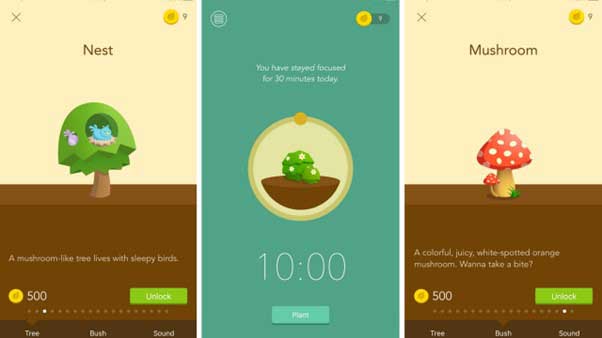
Forest operates on an elegantly simple premise: plant a virtual tree when you need to concentrate, and watch it grow as you resist phone temptation.
Opening blocked apps kills your sapling, creating genuine motivation to maintain focus.
This psychological approach taps into our natural desire for achievement and completion, making productivity feel less like discipline and more like play.
The application’s effectiveness stems from its visual feedback system.
Users witness their forest expand with each successful focus session, creating a tangible representation of accumulated productivity.
Research from the American Psychological Association demonstrates that visual progress tracking significantly enhances goal completion rates, validating Forest’s core methodology.
Key Features That Drive Results
Core Functionality:
- Customizable timer sessions (10 minutes to 2 hours;)
- Whitelist system for essential applications;
- Detailed statistics tracking daily and weekly patterns;
- Real tree planting partnership with Trees for the Future;
- Social accountability through friend challenges;
- Tag system for categorizing different work types.
The real-world impact distinguishes Forest from generic productivity tools.
Every virtual tree cultivated contributes toward planting actual trees through the app’s partnership with environmental organizations.
This tangible connection between personal productivity and global environmental benefit creates deeper user engagement than standard focus applications.
Who Benefits Most From Forest?
Students preparing for examinations find Forest particularly valuable for maintaining study discipline.
Professionals managing remote work environments use it to establish clear boundaries between focused work blocks and break periods.
Creative individuals leverage the tool to protect deep work sessions essential for quality output.
The application serves anyone struggling with smartphone dependency during critical tasks.
Parents use it to model healthy technology habits for children, while freelancers employ it to maximize billable hours.
According to productivity experts at Harvard Business Review, structured focus intervals combined with accountability mechanisms produce measurably better work outcomes than willpower alone.
Technical Specifications and Compatibility
Forest supports both iOS and Android mobile platforms natively, with cloud synchronization ensuring progress tracking across devices.
The interface maintains minimal resource consumption, operating smoothly on devices running Android 5.0 or iOS 11.0 and above.
Premium features unlock through a one-time purchase, eliminating subscription fatigue.
Running Forest on Your Windows PC
While Forest primarily targets mobile users, running it on your computer offers advantages for desktop-focused work.
The larger screen provides better visibility of your growing forest, serving as a constant visual reminder of your productivity commitment.
To access the forest app for pc, utilize BlueStacks Android emulator.
Download BlueStacks from their official website, complete the installation process, then sign into your Google account within the emulator.
Search for Forest in the Google Play Store interface, install the application, and launch it directly from your Windows desktop.
This method provides full functionality with keyboard and mouse control advantages.
Why Forest Outperforms Traditional Timers
✨Unlike basic Pomodoro applications, Forest combines multiple psychological triggers: loss aversion (dead trees), achievement systems (forest growth), social proof (friend comparisons), and altruistic motivation (real tree planting).
This multi-layered approach addresses productivity from various behavioral angles simultaneously.
The statistics dashboard reveals patterns in your focus habits, identifying peak productivity windows and distraction triggers.
These insights enable strategic scheduling of demanding tasks during your naturally focused periods, multiplying the application’s effectiveness beyond simple timer functionality.
Forest transforms the abstract concept of “staying focused” into an engaging, visual experience with real-world consequences.
Whether you’re battling social media addiction or simply seeking better work-life boundaries, this application provides structure without feeling restrictive—making productivity genuinely sustainable.